Welcome Guest ( Log In | Register )

 
Reply to this topicStart new topic
> [Script] Percentage Ranges 1.0.7, another LPR

 
post Nov 29 2025, 14:14
Post #1
剑行血间


Peerless Poster
*******
Group: Gold Star Club
Posts: 1,006
Joined: 13-July 20
Level 500 (Ponyslayer)


Attached File  Percentage_Ranges_1.0.7.js.txt ( 20.45k ) Number of downloads: 29

The major update to version 0.91 will completely break the LPR script. We could attempt to patch it, but I plan to create an entirely new script instead.

Of course, the vast majority of the work (primarily the math) remains unfinished.

It currently provides the following features:
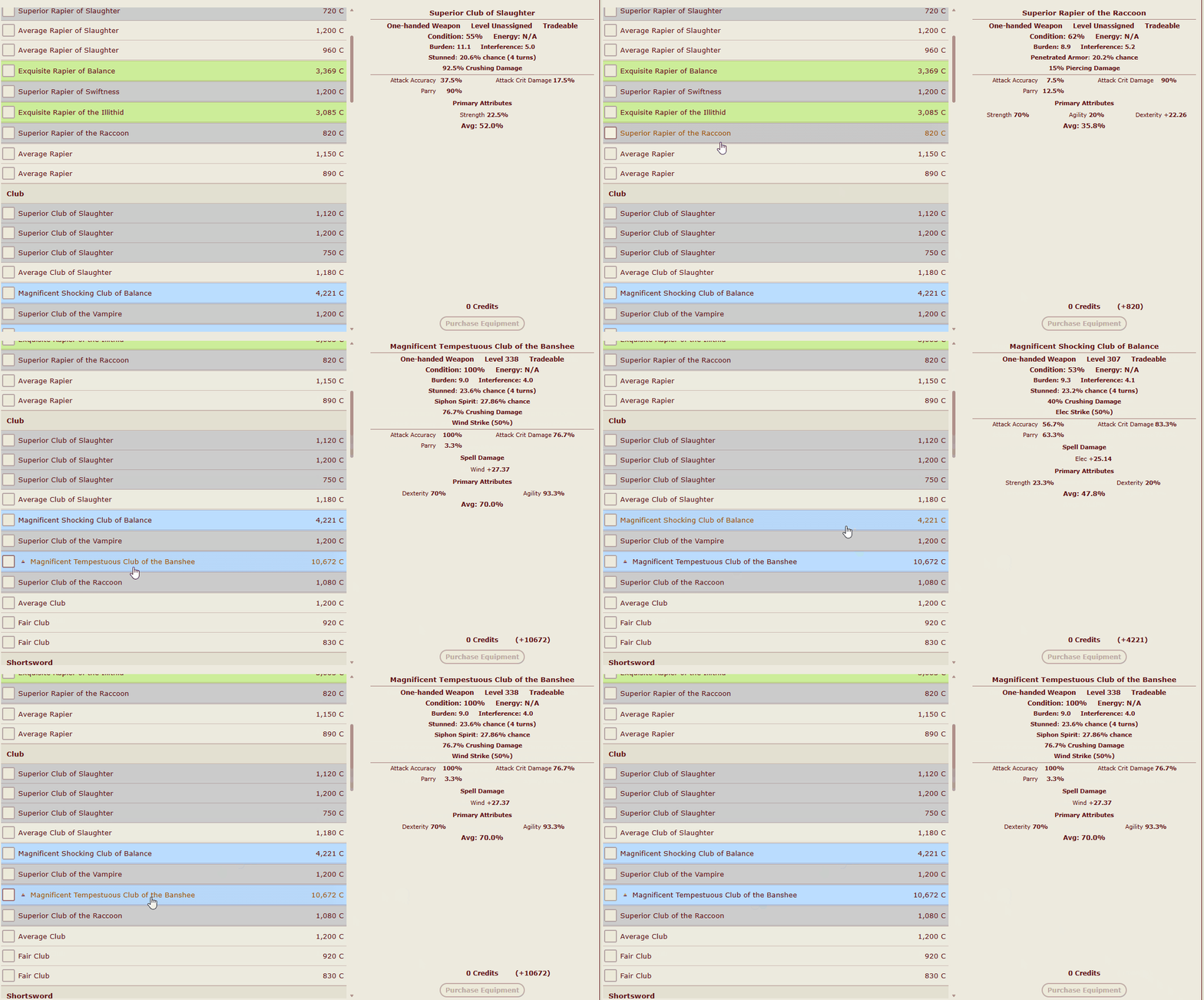
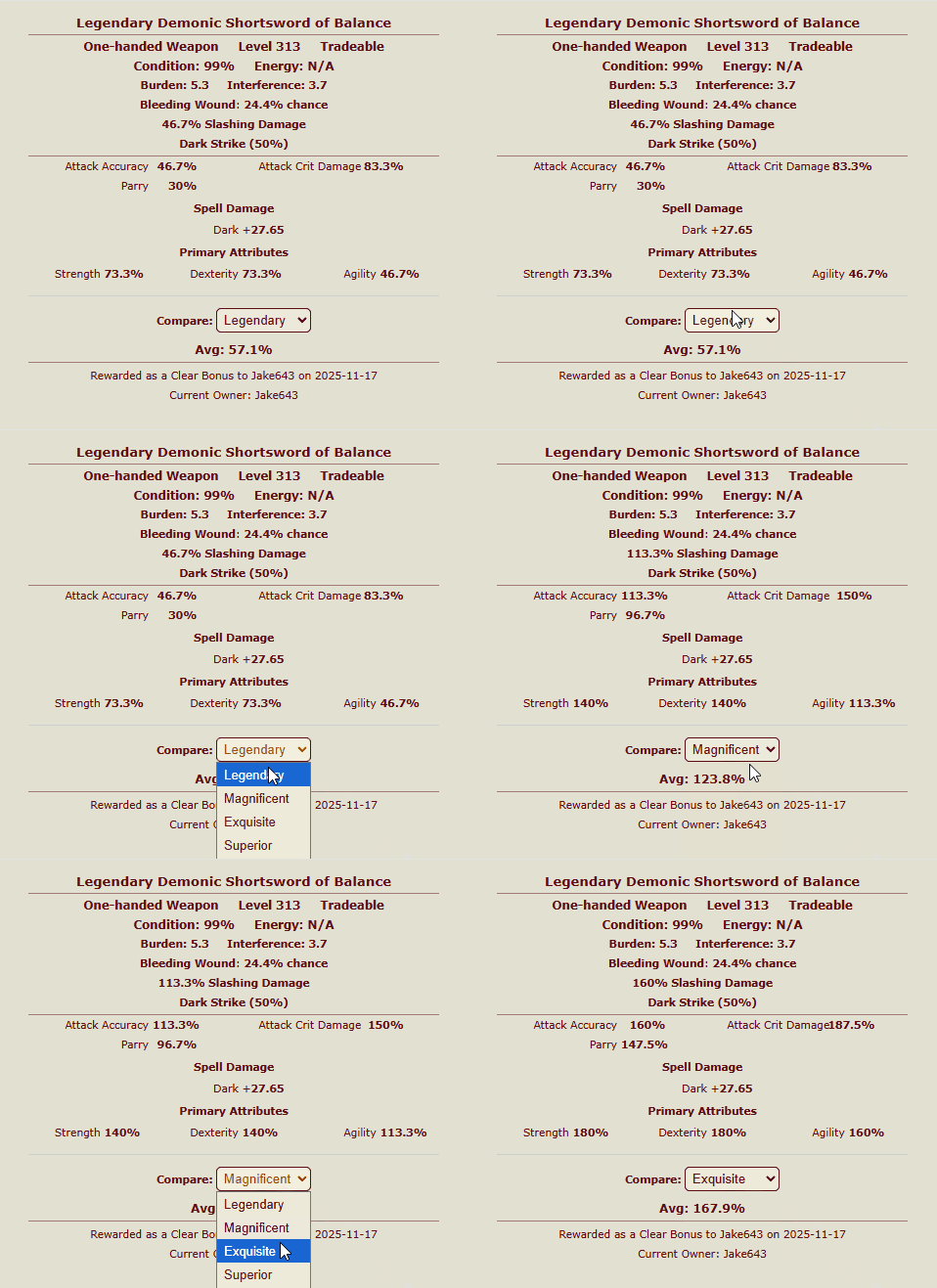
  • Replaces numerical values of attributes with percentages (except in the equipment comparison interface); press 'f' to toggle.
  • Calculates the average percentage for all attributes.
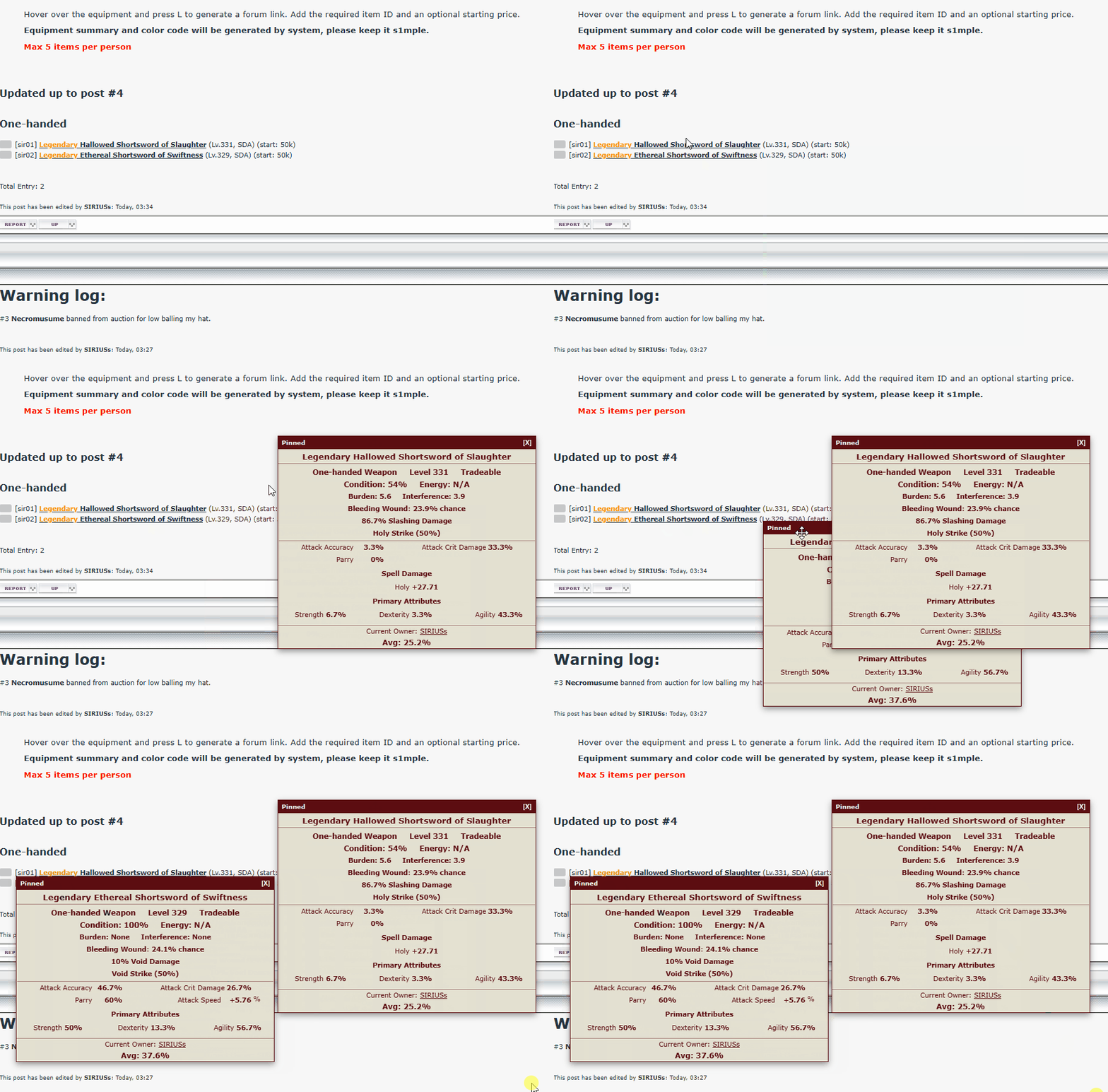
  • Displays a floating equipment page when hovering over equipment links on the forum. (Ensure your HV login status has not expired.)
  • Allows pinning the floating page to make comparison easier (default key is 'q'; I originally wanted 'p', but it's a bit too far from my fingers).
Honestly, I've mashed two scripts together here. I'd rather not split them up so I can keep reusing the code.
Please note that this currently applies only to ISK and equipment links. I hope this will enhance your experience at Noni's Auction.
If you previously used my old version, remember to delete it.

change log:
1.0.1 - Fixed incorrect item quality under specific circumstances (e.g., when dropped by Peerlesssss2).
1.0.2 - Remove Peerless from quality selector
1.0.3 - Fixed key combination
1.0.4 - Add pop width and remove dropped by text, prohibited duplicate pins
1.0.5 - Optimize the style to maintain complete consistency with the game.
1.0.6 - Refactor the toggling logic to support translation scripts.
1.0.7 - Fixed style issues caused by missing ep2 and .ex>div>div:nth-child(3).
Attached Image
Attached Image
Attached Image

This post has been edited by 剑行血间: Yesterday, 14:56
User is online!Profile CardPM
Go to the top of the page
+Quote Post

 
post Nov 29 2025, 14:37
Post #2
what_is_name


Active Poster
*******
Group: Gold Star Club
Posts: 1,133
Joined: 5-May 19
Level 500 (Ponyslayer)


just a recommend for the name, as the database is not "Live" anymore, why still call it Live Percentile Ranges
User is offlineProfile CardPM
Go to the top of the page
+Quote Post

 
post Nov 29 2025, 14:59
Post #3
剑行血间


Peerless Poster
*******
Group: Gold Star Club
Posts: 1,006
Joined: 13-July 20
Level 500 (Ponyslayer)


Maybe I'm just too nostalgic for LPR. Plus, I'm a naming idiot.
"Percentage Ranges" fits better?
User is online!Profile CardPM
Go to the top of the page
+Quote Post

 
post Nov 29 2025, 15:08
Post #4
Lady_Slayer


Member of the Bal'masqué
*********
Group: Catgirl Camarilla
Posts: 6,244
Joined: 20-December 16
Level 500 (Ponyslayer)


QUOTE(what_is_name @ Nov 29 2025, 20:37) *

just a recommend for the name, as the database is not "Live" anymore, why still call it Live Percentile Ranges


dead percentile ranges

nah I'm kidding
(IMG:[invalid] style_emoticons/default/tongue.gif)
User is offlineProfile CardPM
Go to the top of the page
+Quote Post

 
post Nov 29 2025, 15:11
Post #5
Shank


Roll for Initiative
**********
Group: Global Mods
Posts: 9,922
Joined: 19-May 12
Level 500 (Ponyslayer)


QUOTE(剑行血间 @ Nov 29 2025, 12:59) *

"Percentage Ranges" fits better?

If it says what's in the tin, it's a good name.
User is online!Profile CardPM
Go to the top of the page
+Quote Post

 
post Nov 29 2025, 18:03
Post #6
BlackHimari


Freelance Translator
********
Group: Gold Star Club
Posts: 2,760
Joined: 11-December 10
Level 500 (Ponyslayer)


Thanks for your contribution! And here are some suggestions:
1. Slightly increase the width of "div.hv-tip" and "div.hv-pin-box" to, let's say, 360px, to prevent word-wrap when toggling with "F" key.
2. The additional information about how items are generated (dropped by monster for player) could just be removed from the tooltip. Personally I don't think it does anything at all. However, the Current Owner information can still stay.
3. The tooltip of the same item should not be allowed to be pinned more than once. Go to a Noni's auction post, hover the cursor over the item link, then press "Q" multiple times to reproduce this issue.

Edit: Updated so quickly. Many thanks for your hard work!

This post has been edited by BlackHimari: Yesterday, 13:18
User is offlineProfile CardPM
Go to the top of the page
+Quote Post

 
post Yesterday, 14:46
Post #7
nekolor


Casual Poster
***
Group: Members
Posts: 135
Joined: 16-June 14
Level 492 (Godslayer)


Hey! I already have my own on-hover equipment tooltip script! How dare you? (IMG:[invalid] style_emoticons/default/smile.gif)
Although I only planned to add pinning for those, if I'm in the mood.

I still have no idea what exactly those percent values people always talk about mean, but nevertheless, I don't think replacement is a best choice — there is plenty of empty space in equipment pop-up, new info could be simply added.
User is offlineProfile CardPM
Go to the top of the page
+Quote Post

 
post Yesterday, 16:57
Post #8
剑行血间


Peerless Poster
*******
Group: Gold Star Club
Posts: 1,006
Joined: 13-July 20
Level 500 (Ponyslayer)


I tried creating a similar script a year ago, but I couldn't get it to work with LPR, so I delete it.

QUOTE(nekolor @ Nov 30 2025, 20:46) *

I still have no idea what exactly those percent values people always talk about mean


QUOTE(Superlatanium @ Jan 9 2018, 19:28) *

Why/what is a percentile?

A [en.wikipedia.org] statistical term indicating where a number falls in a distribution. For example, something in the 99th percentile is better than nearly everything else in its category; something in the 75th percentile is better than 75%; something in the 25th percentile is better than 25%.

The default display style of equipment shows its scaled stats, which doesn't give you much of an idea of how good the stat actually is compared to other equipments: you have to hover over the stat to see its base value, and then you can compare its base value to the range of base values on the wiki. But this is tedious, and the base values themselves often don't hold much meaning until you reference the wiki, which is too big to memorize. Thus, percentiles: if you haven't memorized ADB ranges, but know that an equipment's ADB is in the 90th percentile, you know that it's well above average.

To calculate: Given a statValue, a statMinimum, and a statMaximum:
percentile = 100 * (statValue - statMinimum) / (statMaximum - statMinimum)


I find it easy to understand that knowing the relative percentage of an absolute value is quite meaningful.
User is online!Profile CardPM
Go to the top of the page
+Quote Post


Reply to this topicStart new topic
1 User(s) are reading this topic (1 Guests and 0 Anonymous Users)
0 Members:


Lo-Fi Version Time is now: 1st December 2025 - 16:30